Turn order and quotation emails into reviewed line items, draft replies and ERP-ready sheets.
OrderBridge reads the orders and enquiries in a mailbox folder you choose, extracts the lines for you to check against the source, and writes approved orders to a Google Sheet in your Drive. Replies are prepared as drafts in the customer's own email thread. A person approves every order and every send.
Try free (beta)How it worksNo payment details. Beta: one workspace, Outlook or Gmail intake, Google Sheets output; features and limits may change.
How it works
- Connect your mailbox
Pick the folder or label OrderBridge watches. Intake is read-only. - Connect Google Sheets
Choose the Drive folder for exports. OrderBridge can see only the files it creates. - Review each order
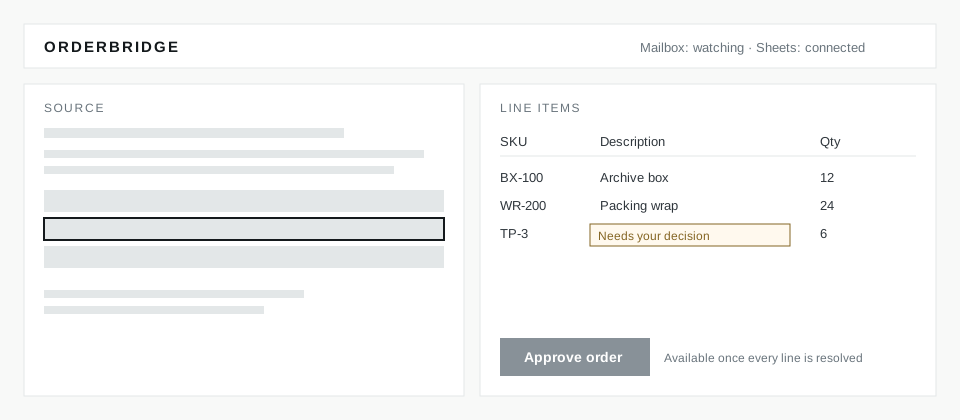
The source document sits beside the extracted lines. Unclear products stop for your decision. - Approve and export
One approval writes the order to your sheet. Quotation replies are drafts you review and send.
Privacy and data handling
OrderBridge processes the messages in the mailbox folder you select and the files it creates in your Google Drive. It does not read other Drive files (Google's drive.file permission). Email intake is read-only; drafts are created in your mailbox and sent only when you choose to send them.
Connection tokens are stored encrypted for your workspace. Each workspace's orders, sheets and mail are kept separate and are never shown on public pages. You can disconnect a mailbox or Google account at any time in Settings.
OrderBridge does not promise uptime or extraction accuracy: every order is reviewed by a person before it is exported.
Frequently asked questions
What does OrderBridge do?
It watches one mailbox folder or label that you choose, extracts the order or enquiry lines from the email and its attachments (PDF, Excel, CSV, Word and images), and shows them next to the source document for review. Approved orders are written to a Google Sheet in your Drive, in the column layout you choose. Quotation replies and follow-ups are prepared as drafts in the customer's original email thread.
Does OrderBridge send email on its own?
No. Quotation replies and follow-ups are created as drafts in your mailbox. You can review a draft and send it from OrderBridge or from your mail app; either way OrderBridge records the send. Follow-up drafts are prepared eight hours after a verified send by default, and only if the customer has not replied.
What access does OrderBridge need?
- Outlook: you sign in with Microsoft and choose one folder. OrderBridge reads messages there and sends the replies you approve.
- Gmail: OrderBridge does not read your mailbox. You forward order emails to a private OrderBridge address, and OrderBridge asks only for permission to send the replies you approve.
- Google Sheets: Google's
drive.filepermission, which covers only files OrderBridge creates. It cannot open your other Drive files.
Your organisation's administrator may need to approve these permissions first. You can disconnect either account at any time in Settings.
Is the beta free, and what are its limits?
Yes. The beta needs no payment details. It supports Outlook or Gmail intake and Google Sheets output for one workspace, with reply drafts in Outlook or Gmail. Shared Google drives are not supported yet. Features and limits may change during the beta, and every order still needs a person's approval.
Contact and feedback
Questions and feedback: reply to your beta invitation email.